

You can find the most recent versions of your consolidated 1099 and other tax documents in the Statements Section (1) within your Schwab Client portal. Simply click on the Tax Forms (2) section to find the form you need to download.
What is a trusted contact?
A trusted contact is a person or persons you authorize Schwab to contact on your behalf if account activity raises concerns such as potential financial exploitation, or if we have problems reaching you or communicating with you about your account.
What is a Trusted Contact Authorized to Do?
Your trusted contact can confirm current contact information, health status, or contact information for other authorized parties associated with the account. Your trusted contact is not authorized to act on your behalf, make transactions, or take other actions on your account.
How to Add a Trusted Contact
STEP 1: Login to your Schwab Account by visiting client.schwab.com.
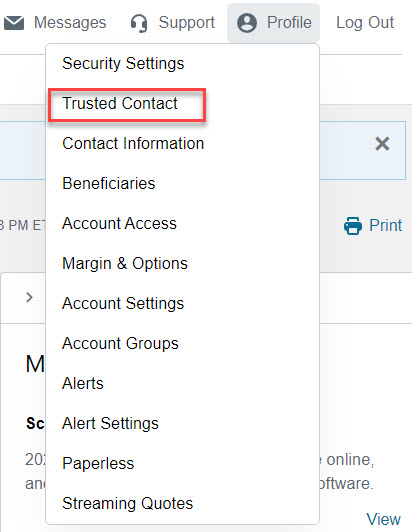
STEP 2: From the top right hand menu click on “Profile”

STEP 3: From the drop down menu, click on “Trusted Contact”
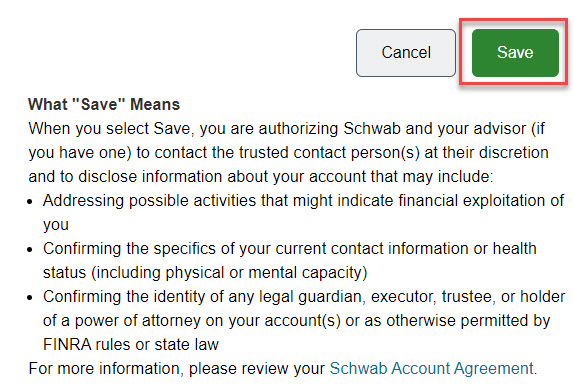
STEP 4: Once you have completed the contact information, click on “Save”
To ADD: To add a new contact click on the green button “Add Trusted Contact”

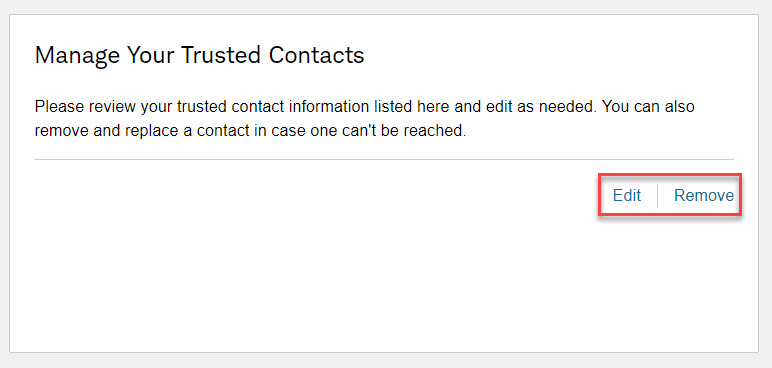
To EDIT or REMOVE: If you already have trusted contacts added, but need to make changes, you can edit or remove under “Manage Your Trusted Contacts”

This resource can be accessed directly through Schwab.
For on-the-go access to your account, use the Schwab Mobile app to view balances and positions, make deposits, and more. Visit the app store designed for your mobile device and search for Schwab Mobile. Use your new Schwab Alliance credentials to log in once your account has transitioned to Schwab.


This resource can be accessed directly through Schwab.
This resource can be accessed directly through Schwab.
This resource can be accessed directly through Schwab.
This resource can be accessed directly through Schwab.
This resource can be accessed directly through Schwab.